Why Every Engineer Should Understand Containers (Even If You Never Write a Dockerfile)
Containers changed how software is built and deployed - here is why understanding them makes you a better engineer regardless of your role
On this page
I used to think containers were a DevOps thing. Something that the infrastructure team handled while the rest of us focused on writing actual code. Then I spent a year at Lululemon containerizing over ten applications, and my entire mental model of how software works changed.
Now I think every engineer - frontend, backend, data, ML, even product-focused engineers - should have a working understanding of what containers are and why they exist. Not to become a Docker expert. But because the concept changes how you think about building and shipping software.
The problem containers solved
Before containers became mainstream, deploying software meant dealing with the “works on my machine” problem constantly. Your application would run fine on your laptop, fail on the staging server because the Python version was different, and behave unexpectedly in production because a system library had been updated somewhere along the way.
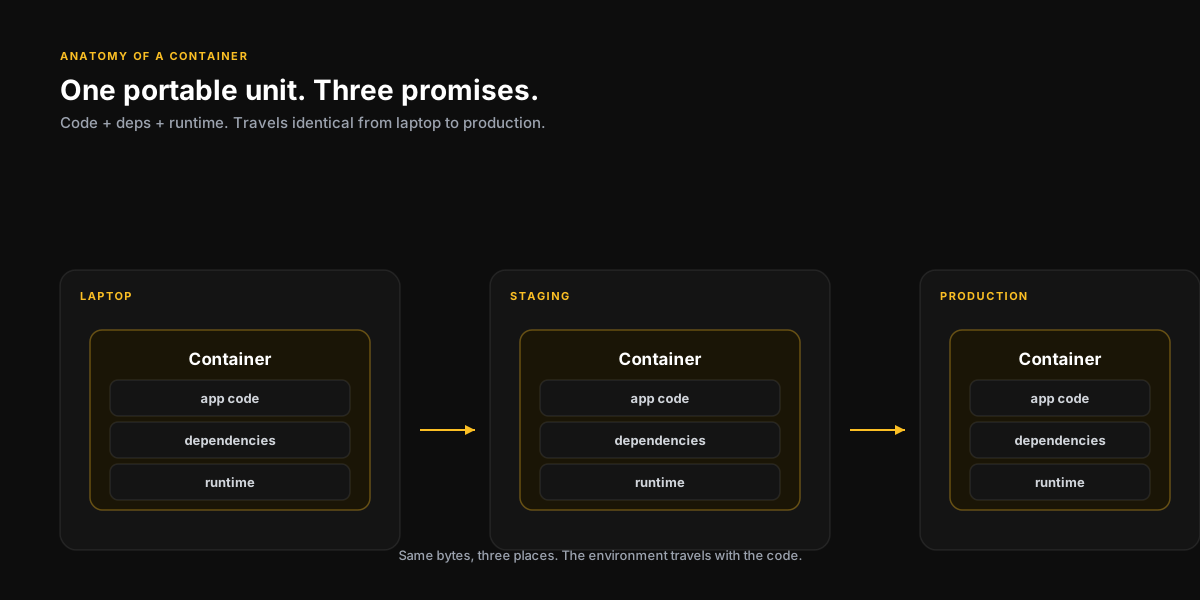
Containers solve this by packaging not just your code, but everything your code needs to run - the runtime, the dependencies, the configuration - into a single, portable unit. That unit runs the same way on your laptop, on a staging server, and in production on Azure or AWS. The environment travels with the code.
A container is not just a deployment artifact. It’s a promise: this software will behave the same way, everywhere it runs.
Why this matters even if you never touch infrastructure
You write more reliable software
When you understand that your code will run inside a container with a fixed, known environment, you start writing code differently. You stop making assumptions about what’s installed on the host. You think more carefully about environment variables and configuration. Your code becomes more portable and more predictable by default.
You debug faster
One of the most frustrating debugging experiences in engineering is the environment-specific bug - something that fails in production but not locally, and you can’t figure out why. When you understand containers, you can actually reproduce the production environment locally and debug the real issue instead of guessing.
AI and ML workflows are increasingly containerized
If you’re building anything with machine learning or AI - model training, inference serving, data pipelines - containers are not optional. They’re the standard way these workloads are packaged and deployed. If you’re touching this space and don’t understand containers, you have a real gap — and it shows up as a very concrete line item in your cloud bill.
The things that actually clicked for me
- Containers are not virtual machines - they share the host OS kernel, which makes them lightweight and fast to start
- Docker is a tool for building and running containers; it’s not the only one, but it’s the most common starting point
- A Dockerfile is just a recipe for building a container image - it’s more readable than it looks at first glance
- Container images are layered - each instruction in a Dockerfile adds a layer, which is why understanding caching matters for build speed
- Container orchestration (Kubernetes, ECS, etc.) is a separate concern from containers themselves - you don’t need both to get started
Where to start if you want to actually learn this
Don’t start with Kubernetes. Don’t start with a tutorial. Start by taking a project you already know - a simple web app or a script - and writing a Dockerfile for it. Get it running locally in Docker. Then try running it somewhere else. That concrete experience will do more than hours of reading.
A minimal, realistic Dockerfile for a Python service looks like this — short enough to fit on a napkin, and 90% of what you’ll write for years:
# Small base. Pin the version — don't chase "latest".
FROM python:3.12-slim

# Don't run as root in production.
RUN adduser --disabled-password --gecos "" app
WORKDIR /app

# Install deps first so Docker can cache this layer across rebuilds.
COPY requirements.txt .
RUN pip install --no-cache-dir -r requirements.txt

# Then copy the code. Changes here don't invalidate the layer above.
COPY . .

USER app
EXPOSE 8000
CMD ["uvicorn", "main:app", "--host", "0.0.0.0", "--port", "8000"]
The order of those instructions is not decorative — it’s the whole reason rebuilds are fast. Deps change rarely; code changes constantly. Put the slow stuff high up in the file.
If you’re trying to level up your understanding of cloud infrastructure, data engineering, or AI deployment - or just want to talk through your career growth in tech - I do sessions for exactly that.
Book a SessionKeep reading
The Intersection of Data Engineering and AI
Why data engineering is the unsung backbone of every successful AI initiative and what it means for the next generation of builders.
6 min readThe Cloud Bill Nobody Talks About: How AI Workloads Quietly Drain Your Budget
AI workloads have a fundamentally different cost profile than traditional software. Here is what you need to understand before your inference bill becomes the conversation in the board meeting.
7 min readFiled under
Previous
AI for Startups
Next
The Cloud Bill Nobody Talks About: How AI Workloads Quietly Drain Your Budget
Want to talk through this?
Book a session and let's get into your specific situation. No slides, no fluff.