The Cloud Bill Nobody Talks About: How AI Workloads Quietly Drain Your Budget
Practical cost management for teams running AI and data pipelines on cloud infrastructure
On this page
The first time I saw an inference bill that had grown 10x in 30 days, I understood why this topic doesn’t get talked about enough. It’s not a comfortable conversation. The product is great, users love it, growth is up - and quietly, in the background, the cost of serving each user has made the economics of the business unworkable.
AI workloads have a fundamentally different cost profile than traditional software. A web app with 10,000 more users uses marginally more compute. An AI feature with 10,000 more users might cost 100x more depending on context window size and model choice. This is the conversation that needs to happen much earlier than it usually does.
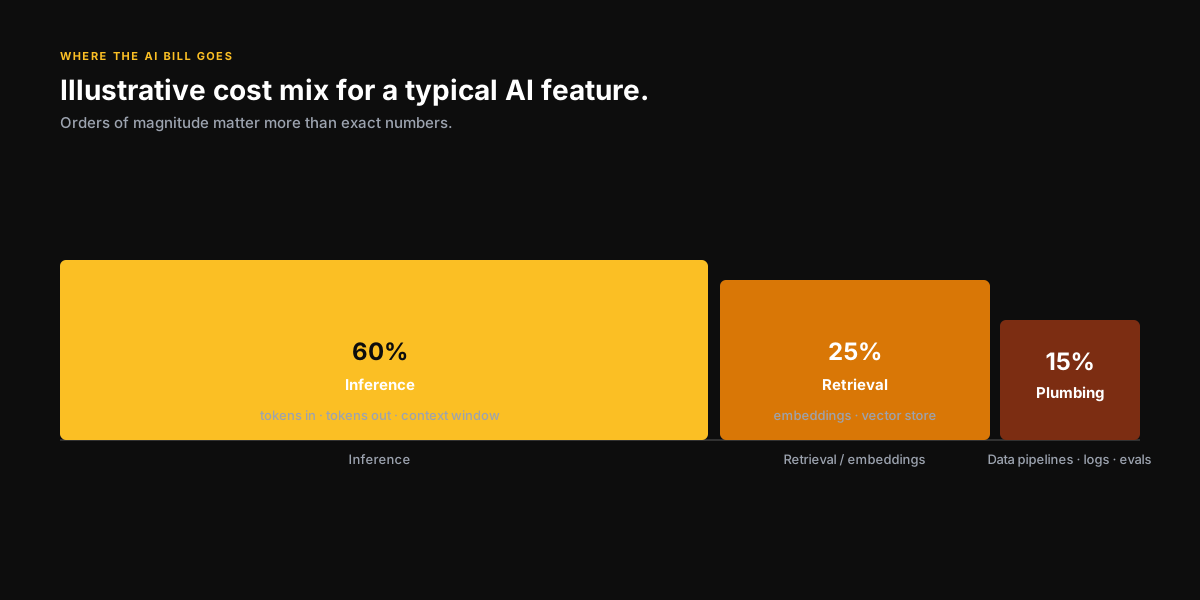
Where the money goes
Inference costs
This is the biggest line item for most AI products. Every call to a large language model costs money - and the cost scales with tokens in and tokens out. A long system prompt, a large context window with retrieved documents, a verbose output - these compound quickly. The model that works great in a demo becomes expensive at scale because demos don’t show you the p99 latency or the average context size at volume.
Embedding and retrieval infrastructure
RAG systems require embedding every document in your corpus and storing those embeddings in a vector database. At small scale this is cheap. At enterprise scale with real-time updates, it’s a significant ongoing cost that many teams don’t model when they build their first RAG prototype.
Data pipeline and storage overhead
AI systems are hungry for data. Training pipelines, evaluation datasets, logging inference inputs and outputs for debugging and compliance - the storage and compute costs of the data layer around an AI system are often as large as the inference costs themselves.
The one spreadsheet every AI team should keep
Before you argue about models, run the arithmetic. A rough back-of-envelope in Python:
# Illustrative numbers — plug in your own.
PRICE_IN  = 2.50 / 1_000_000    # $ per input token  (e.g. GPT-4o-class)
PRICE_OUT = 10.00 / 1_000_000   # $ per output token

def cost_per_request(input_tokens, output_tokens):
    return input_tokens * PRICE_IN + output_tokens * PRICE_OUT

# One "answer a question with RAG" request.
system_prompt = 1_200       # persona + rules + format
retrieved     = 4_000       # 8 chunks of ~500 tokens
user_turn     = 200
output        = 400

per_req = cost_per_request(system_prompt + retrieved + user_turn, output)
# ≈ $0.018 per request

daily_active_users = 50_000
requests_per_user  = 8
monthly_cost = per_req * daily_active_users * requests_per_user * 30

print(f"${monthly_cost:,.0f}/month at this usage")   # ≈ $216,000/month
Notice where the tokens actually live: ~80% of the input cost is the retrieved context, not the user’s question. That is where 80% of your optimization effort should go — better retrieval, tighter chunks, reranking — long before you start shopping for a cheaper model.
The cost management strategies that actually work
- Right-size your model selection - GPT-4 level capability is not necessary for most tasks; a smaller, faster, cheaper model handles the majority of real production use cases
- Implement prompt caching wherever the API supports it - repeated system prompts and few-shot examples can often be cached, reducing cost significantly
- Monitor context window usage aggressively - the biggest single optimization is usually reducing average context size through better retrieval and prompt design
- Build cost attribution into your system from day one - you need to know which feature or which user segment is driving cost before you can optimize
- Set per-user and per-session cost budgets with hard limits - without them, a viral moment or a runaway process can produce a very unpleasant surprise
- Re-evaluate model choices every quarter - the market moves fast and a model that was the only viable option six months ago may now have a cheaper equivalent
The conversation to have before you scale
Before you scale an AI feature, run the unit economics explicitly. What is the cost per active user at 1,000 users? At 10,000? At 100,000? Where does the model break - where does cost outpace the value you’re capturing? Building this model before you need it is the difference between scaling intelligently and scrambling to explain a budget overrun.
If you’re running AI workloads and starting to feel the cost pressure, or if you’re designing an AI system and want to build the cost architecture correctly from the start - I’d love to work through it with you.
Book a SessionKeep reading
AI for Startups
How early-stage founders can actually leverage AI to build faster, leaner, and smarter without needing a research team or a $10M budget.
5 min readRAG vs Fine-Tuning: How to Actually Decide
A decision framework for when to use retrieval vs. when to actually train, from someone who has built both in production at enterprise scale.
7 min readPrevious
Why Every Engineer Should Understand Containers (Even If You Never Write a Dockerfile)
Next
Why I Started Advising Startups While Working a Full-Time Job
Want to talk through this?
Book a session and let's get into your specific situation. No slides, no fluff.