Building Your First Agentic System: What Nobody Tells You Before You Start
The real challenges of building multi-step AI agents, from tool use to error handling to latency
On this page
The demo always looks great. The model picks up the task, calls the right tools in the right order, produces a clean result. Everyone in the room is impressed. Then you try to deploy it and everything breaks.
I’ve built agentic systems for enterprise clients across healthcare, retail, and financial services at Microsoft. Here is an honest account of the challenges nobody mentions in the framework documentation. If you want the 10,000-foot view first, I wrote what agentic AI actually means as a companion piece.
The tool-calling gap
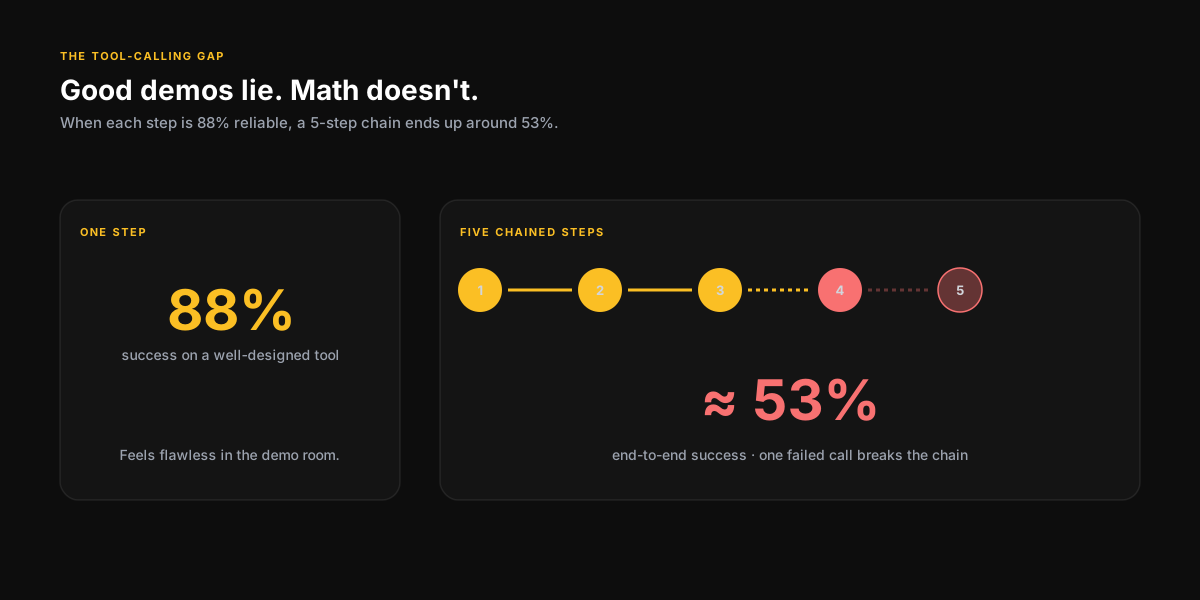
In demos, the model almost always calls the right tool with the right parameters. In production, it does this maybe 85-90% of the time on well-designed tools. That gap is the entire problem.
When your agent makes a wrong tool call in a sequence of five steps, you need to decide: do you retry from the beginning? From the point of failure? Do you surface the error to the user? Most tutorials don’t show you this decision tree because it complicates the narrative. But this is most of the actual engineering work.
An agentic system without a robust error recovery strategy isn’t a product. It’s a demo waiting to break in front of your most important customer.
Tool design is everything
Make tools atomic and predictable
The best tool for an agent to call is one with a single, clear responsibility and a deterministic return structure. The worst is a multi-purpose function that does different things based on undocumented conditions. When the model can’t reliably predict what a tool will return, it can’t reliably use it.
Tool descriptions are part of the prompt
The description you write for a tool is the model’s only information about when and how to use it. Treat it with the same seriousness you would the rest of the system prompt.
Bad:
{
  "name": "search",
  "description": "Search the web."
}
Good:
{
  "name": "search_web",
  "description": "Search the public web for current information. Use when the user asks about recent events, real-time data, or information that may have changed after the model's training cutoff. Do NOT use for internal company docs — call search_internal instead.",
  "parameters": {
    "type": "object",
    "properties": {
      "query": { "type": "string", "description": "A focused search query. No more than 12 words." },
      "recency": { "type": "string", "enum": ["day", "week", "month", "any"], "default": "month" }
    },
    "required": ["query"]
  }
}
The second one gives the model a decision tree: when to reach for it, when not to, and what a well-formed call looks like. That is most of the reliability fix right there.
Latency is a product decision, not just a technical one
Every tool call takes time. An agent that makes five sequential LLM calls plus five tool calls is looking at 20-40 seconds of latency in typical conditions. This is fine for a background research task. It is not fine for a customer service bot where the user is waiting.
- Parallelize tool calls when the results are independent of each other
- Pre-fetch commonly needed context before the agent loop starts
- Build streaming output into the UX so the user sees progress, not a spinner
- Set hard timeouts on tool calls and handle timeouts explicitly
- Consider whether the task actually needs an agent, or whether a simpler single-turn pattern — or plain RAG — would work
A minimal, defensive wrapper around a single tool call goes a long way. Something like:
from tenacity import retry, stop_after_attempt, wait_exponential

@retry(stop=stop_after_attempt(3), wait=wait_exponential(min=1, max=8))
def call_tool(tool, args, *, timeout=8):
    try:
        return {"ok": True, "data": tool.run(args, timeout=timeout)}
    except ToolValidationError as e:
        # Don't retry — the args are wrong. Feed the error back to the LLM.
        return {"ok": False, "error": f"Invalid args: {e}. Reconsider."}
    except TimeoutError:
        return {"ok": False, "error": "Timed out. Try a narrower query."}
The key move is returning structured errors back into the agent’s context instead of raising. The LLM can usually recover from a clear error message. It cannot recover from a stack trace it never sees.
What the frameworks don’t tell you
LangChain, LlamaIndex, Semantic Kernel - these are useful starting points, not production-ready systems. The abstractions they provide are helpful for getting a prototype running. They often become a liability when you need to understand exactly what your agent is doing and why it made a specific decision.
My recommendation: use a framework to build your first version. When it breaks in a way you can’t diagnose through the abstraction layer, that’s usually the right time to move closer to the underlying primitives.
If you’re building or evaluating an agentic system and want to think through the architecture, error handling, and tooling decisions - that’s exactly the kind of problem I work through in advisory sessions.
Book a SessionKeep reading
Prompt Engineering is a Real Skill: Here's What Actually Makes a Good Prompt
The difference between a prompt that works in a demo and one that works in production is not magic. It's a learnable craft with clear principles.
7 min readRAG vs Fine-Tuning: How to Actually Decide
A decision framework for when to use retrieval vs. when to actually train, from someone who has built both in production at enterprise scale.
7 min readPrevious
RAG vs Fine-Tuning: How to Actually Decide
Next
Prompt Engineering is a Real Skill: Here's What Actually Makes a Good Prompt
Want to talk through this?
Book a session and let's get into your specific situation. No slides, no fluff.